Where to find assets
Every Eden sector bounty uses only the approved packs already migrated into the MU game project. You do not buy anything: you get the assets by cloning the MU project with the Git bounty kit.
1 · Get the project
- Register as a contributor and get repo access (private repo: MuDevelopment/MU_V001).
- Follow the Git bounty kit: install Git + Git LFS, clone the repo, run
git lfs pull. - Open the
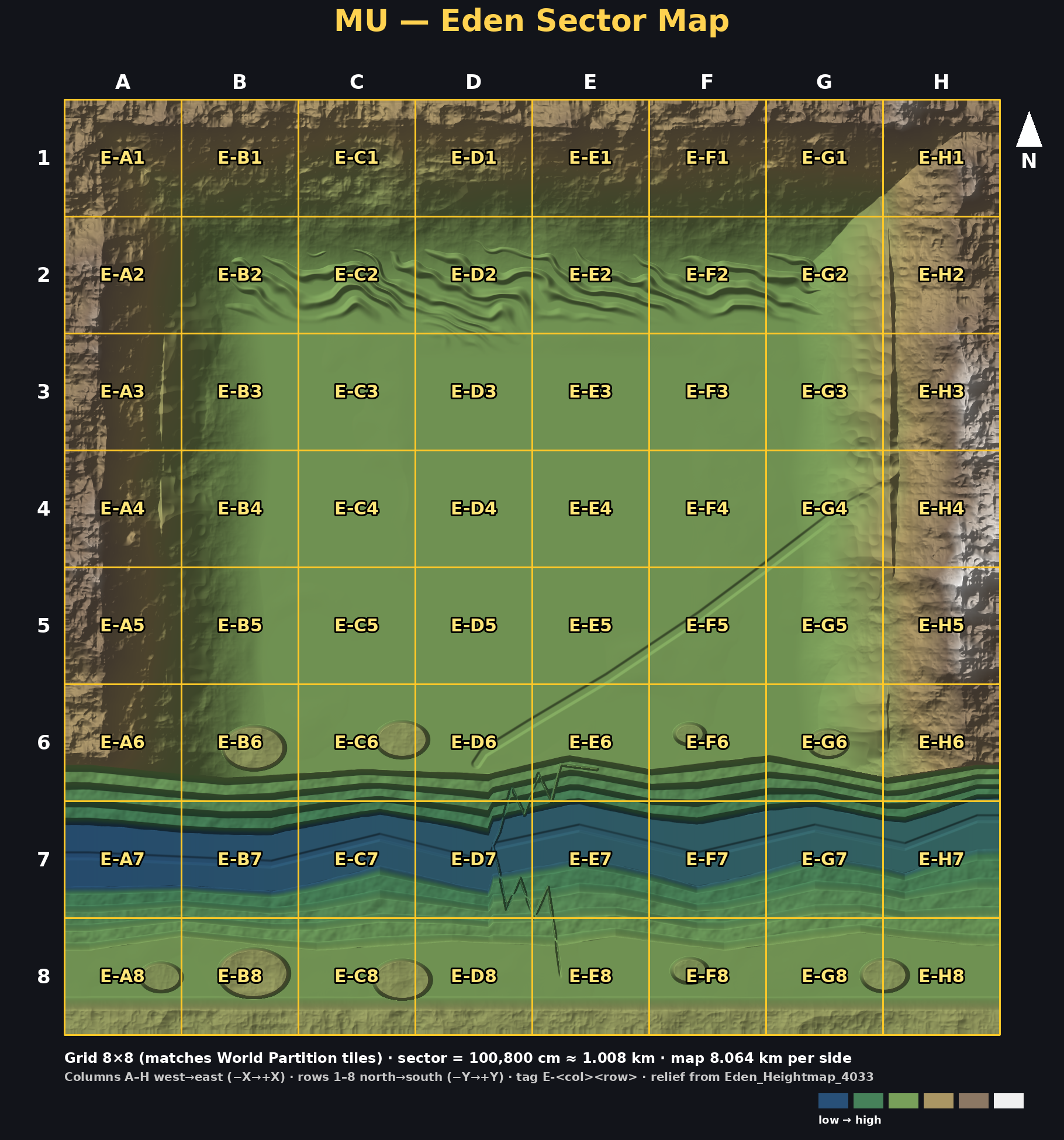
.uprojectin Unreal Engine 5.8 and open the level /Game/MU/Levels/Eden/L_Eden_Terrain_WP (World Partition). The sector grid is in the Outliner folder Sectors; north = −Y. Grid 8×8, 100,800 cm sectors, columns A–H west→east, rows 1–8 north→south. - Create your branch
bounty/MU-1xx-E-XXand load only your sector's World Partition cells.
2 · Approved packs (inside the project under /Game/)
| Pack | Path in project | Use for |
|---|---|---|
| Hyper auto landscape material | /Game/Hyper/AutoLandScapeMaterial (LandscapeMaterial, LandscapeMaterialLayers, FoliageLayers, MaterialFunctions) | Landscape material: M_AutoLandscape_Master with MI_IslandLandscape, MI_MountainLandscape, MI_CanyonLandscape; grass / dirt / rock / sand / beach / path layers |
| Hyper ResourcePack — environments | /Game/Hyper/ResourcePack/Environments/ {Foliage, Landscape, Rocks, Water, Textures, MaterialLayers} | Rock faces (SM_HadriansWall_RockFace_002_RotatedFlat_NoGrass), jungle plants (anthurium, calathea, celandine, dandelion, SM_BogMyrtleBush_01), water (SM_OceanWater, BP_TranslucentWater) |
| Hyper ResourcePack — raw resources | /Game/Hyper/ResourcePack/Raw_Resources/ {Ores, Coin} | Ore and coin resource nodes (only where a bounty asks for them) |
| Hyper ResourcePack — props | /Game/Hyper/ResourcePack/Props | Simple props (e.g. SM_Pillar_Hyper, SM_Sign); no Hyper logo/Discord meshes in the world |
| OWD Plants Pack | /Game/OWD_Plants_Pack/Plants/Meshes (+ Variation), /Game/OWD_Plants_Pack/Add_Props/Grass/Meshes, /Game/OWD_Plants_Pack/Add_Props/Stones/Meshes | Plants SM_Plant_01_1_G…, grass SM_Grass_05_2/05_4/06_3, stones SM_Stone_01…04 |
| Palms Tree Selection 2 | /Game/PalmsTreeSelection2/Meshes | Palms: SM_PalmCoconutA–C, SM_PalmCocoMarmuA–C, SM_PalmOldA–E, SM_PalmOtherA–B |
| MS Presets foliage material | /Game/MSPresets/MS_Foliage_Material | Foliage master material (MA_Foliage) and wind functions; not a placement asset |
| Water plugin (engine) | Engine/Plugins/Experimental/Water | WaterBodyRiver, WaterBodyLake, WaterBodyOcean actors |
Not yet in project — do not use: BlackAlder, Bazaar, Modular SciFi Interior, Rocky Desert, Niagara/VFX packs (BigNiagaraBundle, Realistic Starter VFX), MW Landscape Auto Material, Hyper Locomotion (not a placement asset).
Pyramid compound: Great Pyramid (43970, −130073) in E-E3; Center (−1730, −81073) and Small (−42330, −34173) in E-D4 (Giza diagonal, 0.55 scale). Leave the compound core pyramids and plinths untouched.
3 · Rules
- Use only the packs above. Do not import new marketplace/Fab content or anything you bought yourself.
- Do not move, rename or edit pack assets or the shared landscape material. Make placements only.
- Edit only your sector's bounds and World Partition cells (see your bounty card).
- Blend zone: you may smooth/height-match terrain up to 20 m (2,000 cm) past shared edges so seams blend — terrain only, nothing new placed there.
- Trees and rocks will later become the harvestable blueprint. Place them so they can be swapped (Foliage tool instances, not merged meshes).
- Assets are licensed for use inside the MU project only. Do not copy packs out of the project or reuse them elsewhere.
4 · Sector map